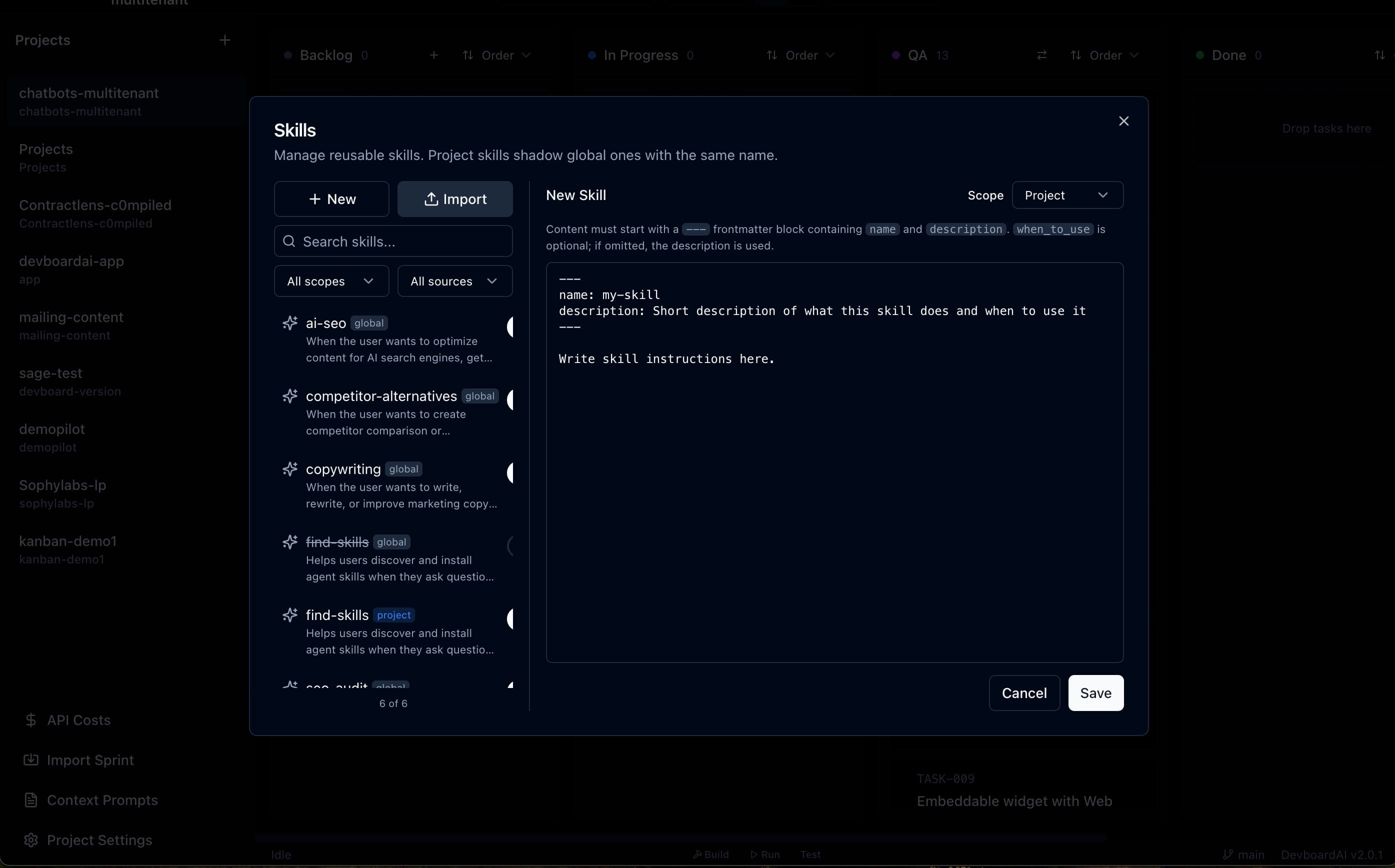
Skills in DevboardAI are reusable Markdown playbooks with YAML frontmatter that you write once and attach to any task, so the agent follows the same instructions every run. They come in two scopes, global and project, with project skills overriding global ones of the same name, and they work with Claude Code, OpenAI Codex, and Kimi.
The problem skills solve
Every developer using AI coding agents ends up with a notes file full of “always do X,” “never touch Y,” and “when generating commit messages, follow this format.” The current move is to paste this into the prompt every time, or stash it in a CLAUDE.md at the repo root and hope the agent reads it.
Neither scales. Prompts drift. CLAUDE.md turns into a 600-line attic. And nothing is reusable across projects.
Skills are the fix: small, named, single-purpose Markdown files you write once and attach when you need them.
What a skill looks like
A skill is a SKILL.md file with YAML frontmatter and a body:
---
name: release-notes
description: Write release notes from a list of merged PRs
when_to_use: When the task touches CHANGELOG.md or generates a release blurb
---

Group PRs into Features, Fixes, and Internal.
Lead each entry with a verb. Link the PR.
Skip dependency bumps unless they fix a CVE.
Keep the whole thing under 200 words.
Three fields up top, instructions below. That's it. name and description are required; when_to_use is optional but recommended — the orchestrator uses it to decide whether the skill is relevant to the task at hand.
Two scopes, one override rule
- Global skills live in your DevboardAI home and apply to every project. Good for habits that follow you everywhere:
commit-style,code-review,be-concise. - Project skills live with a project and only apply inside it. Good for codebase-specific rules:
nextjs-app-router-only,postgres-no-orm,tailwind-design-tokens.
When a project skill and a global skill share the same name, the project version wins. That means you can override your default commit-style on a single repo without forking it, and without touching the global one.
How to attach a skill
Skills attach in two places in DevboardAI:
- At task creation — the “Create Task” dialog has a SkillPicker. Pick the playbooks the task should follow before you save it.
- On an existing task — open a card and use the Capabilities tab. Toggle skills on/off and you'll see the change reflected in the next run.
The list of available skills is the union of the project's skills and your global skills, with project versions shadowing same-named global ones.
Skills + MCP = the actual workflow
Skills tell the agent what to do. MCP servers give it the tools to do it. The pair is what makes a sprint feel competent instead of clever.
Worked examples from real DevboardAI users:
- Release notes: a
release-notesskill + the GitHub MCP server. The agent lists merged PRs, groups them, drafts the notes. - Visual regression: a
visual-qaskill + the Playwright MCP server. The agent navigates the changed pages, screenshots, and writes up regressions. - Triage: a
bug-triageskill + the Linear MCP server. The agent picks unassigned bugs, asks the right diagnostic questions, files reproductions.
On the task's Capabilities tab, you see the skills attached, the MCP servers attached, and which tools the agent is allowed to call — all in one place.
Import what you already have
If you've been collecting SKILL.md files in a personal notes repo, you don't have to rewrite anything. The Skills UI accepts any SKILL.md with valid frontmatter — name, description, optional when_to_use. Drop the file in, it parses, it's ready to attach.
The frontmatter parser is intentionally minimal (no js-yaml dependency), so it's strict about format but predictable. Quoted values work, block scalars (|) and folded scalars (>) work, anything fancier should be flattened.
Why this is more than “prompt templates”
Three things separate skills from the snippet folders you've probably already built:
- Scope-aware. Project and global, with a clear override rule. No copy-paste between repos.
- First-class in the UI. SkillPicker on task creation, Capabilities tab on task detail, search + filter in Settings. Skills aren't buried in files you forget about.
- Composable with MCP. A skill that says “always file a Linear bug when QA fails” only works if the Linear MCP is also attached. DevboardAI shows both in one view so the dependency is obvious.
Frequently asked questions
What is a skill in DevboardAI?
A skill in DevboardAI is a reusable Markdown playbook with YAML frontmatter (a name, a description, and optional when_to_use) plus a body of instructions that you write once and attach to any task. When the agent runs the task, the skill's body is included in its context so the same playbook is applied every time.
What is the difference between global and project skills in DevboardAI?
Global skills in DevboardAI are available to every project on your Mac, while project skills apply only to tasks inside that one project. If a project skill and a global skill share the same name, the project version wins, so you can override a default playbook on a per-codebase basis.
Can I import existing SKILL.md files into DevboardAI?
DevboardAI's Skills UI imports any existing SKILL.md file that has a valid frontmatter block. The minimum required fields are name and description; when_to_use is optional but recommended.
How do skills compose with MCP servers in DevboardAI?
Skills tell the agent what to do and MCP servers give it the tools to do it, so in DevboardAI you typically attach a skill and an MCP server to the same task, for example a 'release-notes' skill alongside the GitHub MCP, or a 'visual-regression' skill alongside the Playwright MCP. The Capabilities tab shows everything attached to a single task in one view.
Do DevboardAI skills work with Claude Code, Codex, and Kimi?
DevboardAI skills work with Claude Code, OpenAI Codex, and Kimi because skills are CLI-agnostic: they are plain Markdown that the orchestrator injects into the prompt regardless of which agent runs the task.