MCP (Model Context Protocol) is an open standard that lets AI coding agents call external tools like GitHub, Linear, and Playwright through a uniform interface. DevboardAI builds a native UI on top: install any MCP server in two clicks, store secrets in macOS Keychain, and scope tools per project or per task — no JSON editing required.
What is MCP, in one paragraph
MCP (Model Context Protocol) is an open standard from Anthropic that lets AI coding agents talk to external tools — GitHub, Linear, your filesystem, a browser, a database — through a uniform interface. An MCP server exposes capabilities (tools, prompts, resources) and any MCP-aware agent can call them. It's what turns Claude Code from a smart text generator into a thing that can actually open a PR for you.
The catch: until now, wiring up MCP servers meant hand-editing JSON config files for each CLI, juggling API keys in shell exports, and praying you didn't commit a secret. DevboardAI's new MCP layer removes every step of that.
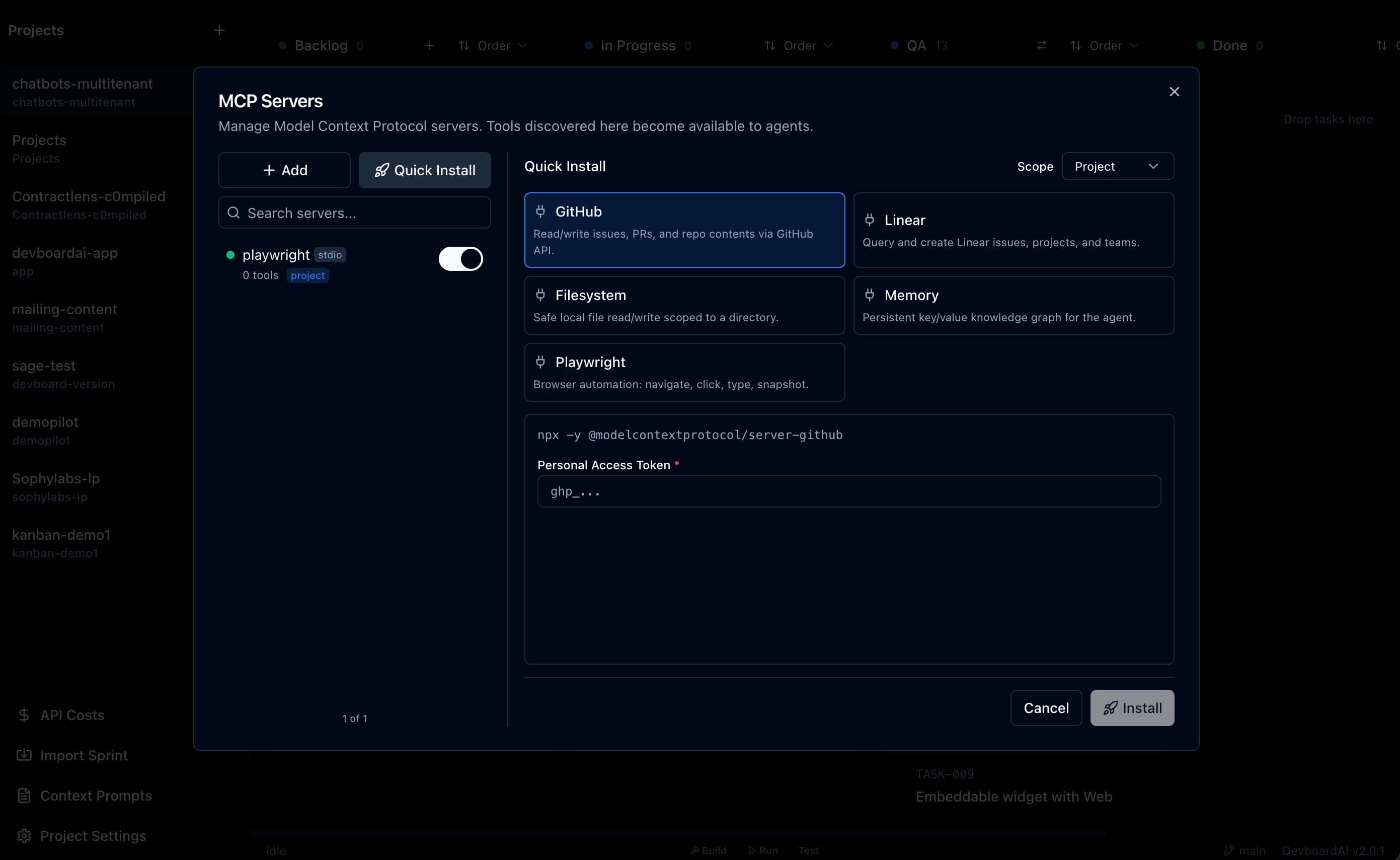
Quick-install in two clicks
DevboardAI ships built-in templates for the MCP servers most coding agents actually use:
- GitHub — read/write issues, PRs, and repo contents via the GitHub API.
- Linear — query and create Linear issues, projects, and teams.
- Filesystem — safe local file read/write, scoped to a directory you choose.
- Memory — a persistent key/value knowledge graph the agent can write into across runs.
- Playwright — full browser automation: navigate, click, type, snapshot.
Click the template, paste your token, hit Install. DevboardAI handles the npx command, the args, and the env wiring for you. You don't see claude_desktop_config.json once.
Bring your own server
Anything that speaks MCP works. DevboardAI supports both transports the spec defines:
- stdio — for local processes started by a command (the common case).
- HTTP — for hosted MCP services you point at by URL.
Paste your command, args, and env. Save. The server is now available to every agent DevboardAI launches.
Secrets live in Keychain, not on disk
This is the part most MCP setups get wrong. DevboardAI splits each MCP server's env into two buckets:
- Values prefixed with
secret:(or marked secret in the UI) are written to the macOS Keychain viakeytar. - Plain values (
NODE_ENV=production, paths, flags) stay in the SQLite row.
The SQLite row stores a placeholder where the secret would have been. At launch time, DevboardAI hydrates the real value from Keychain and passes it to the child process as an environment variable. Plaintext tokens never touch a config file, never get committed, and never leak into logs.
Three scopes: global, project, per-task
A GitHub server with a personal-access token should follow you everywhere. A Filesystem server scoped to /Users/you/work/clientA should only show up on Client A's project. A task that just needs to read a webpage shouldn't have the GitHub write tool dangling next to it.
DevboardAI handles all three:
- Global — available to every task in every project.
- Project — only available to tasks in this project. Overrides a same-named global server.
- Per-task allowlist — pick which servers (and even which capabilities) are exposed to a single task.
The per-task allowlist is the part you'll quietly fall in love with. It's the difference between an agent that runs ten tools because they're configured and an agent that runs the two it needs.
Capability discovery, with a refresh button
After you install an MCP server, DevboardAI introspects it and lists every tool, prompt, and resource it exposes — with descriptions and JSON schemas. You can see exactly what an agent could call before it calls anything. There's a Refresh button when the server updates.
Logs stream live too — stdout, stderr, and exit events from the MCP child process show up in a pane next to the capability list. When something doesn't work, you don't have to dig through ~/Library/Logs/.
How it lands in a sprint
Here's the workflow MCP unlocks inside DevboardAI:
1. Install GitHub MCP (Quick Install → paste PAT → Save).
2. Install Filesystem MCP scoped to your repo.
3. Generate a sprint from a brief like “triage open issues labeled bug and draft PRs for the ones with reproductions.”
4. On each card, attach only the GitHub tools the task needs — list_issues, get_issue, create_pull_request.
5. Hit Run. The orchestrator launches parallel agents against worktrees, each with a tight tool surface.
The agents stay focused because the tools are scoped. You stay sane because the API keys are in Keychain and the state of the sprint is on a Kanban board, not in your head.
Why this matters more than “another integration”
Agents are only as useful as the tools they can call. Until MCP, every CLI invented its own plugin system and every plugin was a snowflake. MCP is the moment that ends — one protocol, one set of tools, every agent can use them.
DevboardAI's job is to make that practical on a Mac: visual install, scoped access, Keychain-backed secrets, a per-task allowlist. The CLIs underneath still do the work. You just stop being the integration layer.